
Certificates overview
Certificates
This book is a user manual for the Certificates module. It explains what users can do in the module and which permissions are needed.
The Certificates module is used to keep track of important vessel certificates, inspections, endorsements, renewals, expiry dates and supporting documents.
Use this module to:
- Store certificate details such as title, certificate number, issuer, issue date and expiry date.
- Attach certificate files, such as PDF scans or images.
- Group certificates into a clear structure.
- See which certificates are expired or due soon.
- Export the status overview to PDF or Excel.
- Renew certificates while keeping the old certificate in the archive.

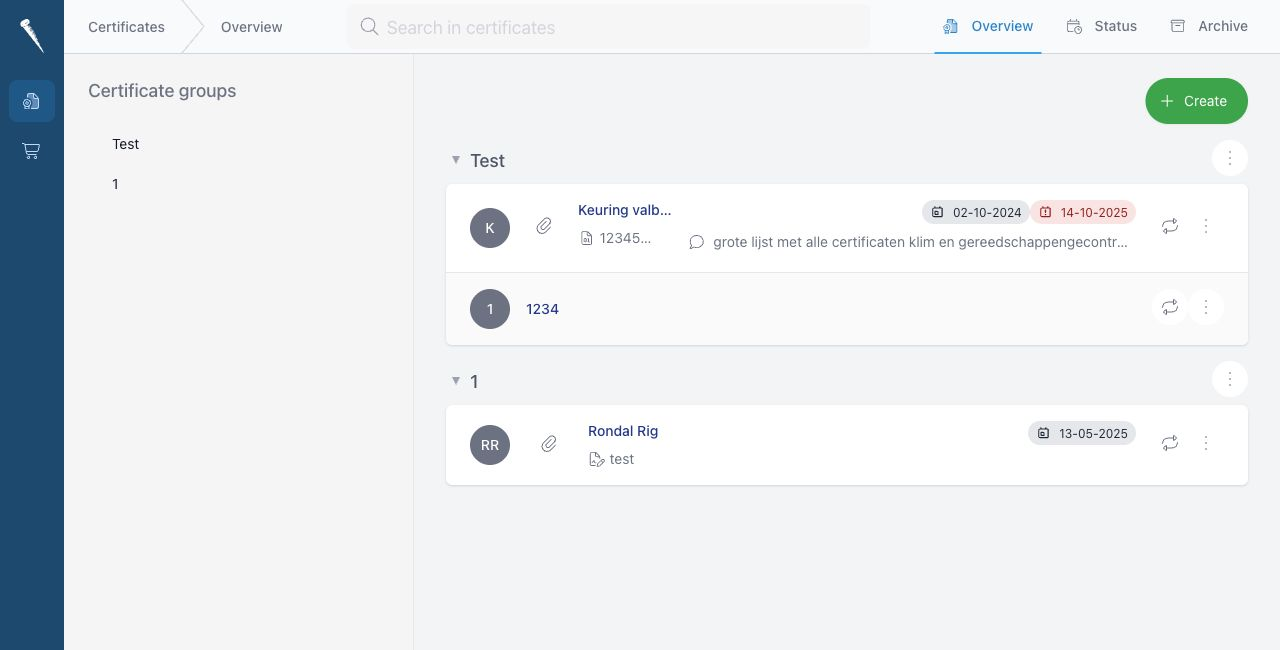
Main Sections
The module has three main tabs.
| Tab | Purpose |
|---|---|
| Overview | Shows active certificates grouped by certificate group. |
| Status | Shows expired certificates and certificates due before a selected date. |
| Archive | Shows archived certificates, usually older versions after renewal. |
Certificate Groups
Certificates are organised in groups. The group list on the left side of the Overview page can be used to quickly jump to a group.
Groups can be nested. Child groups inherit access from their root group.
Certificate Status Colours
Date badges help you quickly see certificate status.
| Colour | Meaning |
|---|---|
| Red | The certificate or endorsement date is overdue. |
| Yellow | The certificate or endorsement is due soon. |
| Green or grey | The certificate is not currently due. |
Permissions
What you can see or do depends on your user role.
Users with read access can view certificates in the groups they are allowed to access.
Users with write or manage access can create, edit, renew, endorse, archive and delete certificates, depending on their permissions.